

YouTube says its feed is safe for children, is it?
YouTube Kids is too restrictive and too permissive at the same time. It blocks plenty of good content that’s perfectly fine for children — the volcanoes documentary, football skills channel and the Lego stop-motion creator your eight-year-old has been following — so parents give up and hand over the main app instead.
And YouTube Kids still runs the same recommendation engine, the same autoplay, the same endless feed designed to keep children watching.
YouTube says its feed is safe for children, is it?
YouTube Kids is too restrictive and too permissive at the same time. It blocks plenty of good content that’s perfectly fine for children — the volcanoes documentary, football skills channel and the Lego stop-motion creator your eight-year-old has been following — so parents give up and hand over the main app instead.
And YouTube Kids still runs the same recommendation engine, the same autoplay, the same endless feed designed to keep children watching.
One app. Two modes.
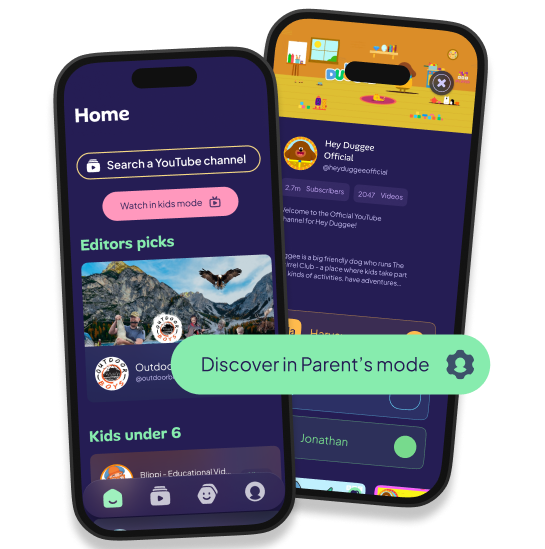
Parent’s mode
Access parent’s mode with your secure PIN and curate channels for each child.
- Allow channels from our Streamu Verified collections, or add any channel from YouTube search
- Choose which kids it’s approved for
Up to four profiles per family, so siblings of different ages and interests each get their own feed.

Kids mode
Your child opens the app and sees only what you’ve approved for them.
No search bar, no recommendations, no autoplay, no path to the rest of YouTube.
Lock devices to kids mode. A shared family tablet stays locked to kids mode; a personal device stays locked to one child’s profile. Either way, your child can’t get back into parent mode without the PIN.
One subscription. The whole family.
- Add up to four kids profiles.
- Approve unlimited channels.
- Access Streamu Verified collections.
- Watch unlimited videos.
- Sign in to up to 8 devices.
- Lock any device to kids mode.
- No autoplay and no endless scroll.
- No recommendations.
Now available
for iOS and Android
Try it free for 14 days.


Coming soon to Amazon Fire and Smart TV.

Finally, I don’t have to hover over my son while he watches his favourite YouTube creators.
Mum of two under 10

Let’s build a better, healthier online experience for our kids, together.
Join our growing community of conscious parents and help shape the future of Streamu.
FAQs
Streamu is a parental control app for YouTube built around channel whitelisting. You choose the YouTube channels your child is allowed to watch – the football skills channel, the coding tutorials, the dinosaur documentaries – and Streamu builds a feed from only those channels. Everything else on YouTube is blocked. There are no recommendations, no autoplay, and no search bar for your child.
Whitelisting means you define exactly what your child can see, rather than trying to filter out what they can’t. Instead of blocking bad content from a large pool, you build the pool yourself – channel by channel – and nothing outside it is accessible. Streamu is built entirely around this principle. You search YouTube, tap a channel, choose which of your children it’s approved for, and it appears in their feed. That’s it. There’s no algorithm deciding what comes next, no recommendations pulling them somewhere you didn’t intend, and no search bar giving them a route out. It’s the same core idea behind tools like WhitelistVideo, but Streamu covers the whole family on one subscription rather than charging per child.
YouTube Kids uses a content filter: it tries to remove unsuitable content from a large pool. Streamu uses a whitelist: you define the pool yourself. That distinction matters because YouTube Kids still runs the same recommendation engine and autoplay as the main app – it’s just filtering what those systems serve. Streamu removes the algorithm entirely. Your child only sees what you’ve approved, and there’s no automated pathway beyond it.
Streamu launches on iOS and Android (phone and tablet) in June 2026. Smart TV and web browser access are in development and coming soon. You can lock a shared family tablet to kids mode, or lock a personal device to a single child’s profile – either way, your child can’t access parent mode without your PIN.
Yes. Streamu supports up to four child profiles per family subscription, each with their own separate feed. The four-year-old’s dinosaur channels stay out of the ten-year-old’s coding tutorials. You curate each profile independently from the parent mode on your own phone.
Any public YouTube channel. There are no restrictions on what you can add – educational, creative, sports, gaming, nature, music, comedy – as long as it exists on YouTube and you want your child to see it. The decision is entirely yours. If you’re looking for inspiration, our articles section has curated channel guides by age and interest.
Yes, both. Autoplay is off by default, so one video doesn’t roll into the next. There are no recommendations, no “up next” suggestions, and no algorithmic feed of any kind. Your child watches what they chose to watch, then the video ends.
Most parental control apps – Bark, Qustodio, Google Family Link – are broad monitoring tools. They track usage and flag concerns, but none of them offer channel-level YouTube whitelisting. They can tell you what your child watched; they can’t restrict it to a curated list of channels you’ve approved. Streamu is built specifically for that purpose. The only comparable tool is WhitelistVideo, which also uses a whitelist model but charges per child rather than per family.
A single family subscription covers up to four child profiles. Pricing is £6.99/month or £69.99/year (roughly £5.83/month). There is one subscription per family – not per child. If you’re joining via the waitlist, you’ll be among the first to access early pricing when Streamu launches.
Yes. Because there’s no search bar, no recommendations, and no route into the wider YouTube ecosystem, even very young children can use Streamu safely within the feed you’ve built for them. Many parents find it particularly useful for the 4-10 age range, where YouTube Kids starts to feel too limiting but the main YouTube app feels too open.
Streamu launches in June 2026 on iOS and Android. Join the waitlist here to get early access, be notified the moment it’s available, and help shape the product as part of a growing community of conscious parents taking back control.